Boggle 🔠
Trie to Understand Tries 🌲
The boggle board above is generated with new random letters with every click of the generate board button. From there you can try to find words by starting with any letter and looking to the letters adjacent to it (up, down, left, right, and all diagonals) and continuing in this manner to form words with the only caveat that you can not repeat the same letter/position twice.
To find the longest words with Javascript, I first fetched ~479,000 English words from github.com/dwyl/english-words (which admittedly contains some pretty archaic words), then added every single word to my Trie data structure.
The trie data structure is essentially just a tree where the nodes are letters and as you descend down the tree the letters form words. At each node a letter is stored as well as whether or not this additional letter now forms a word. An example Trie is shown below with the words "he", "hey", "hell", "hello", "world", "word", and "words".
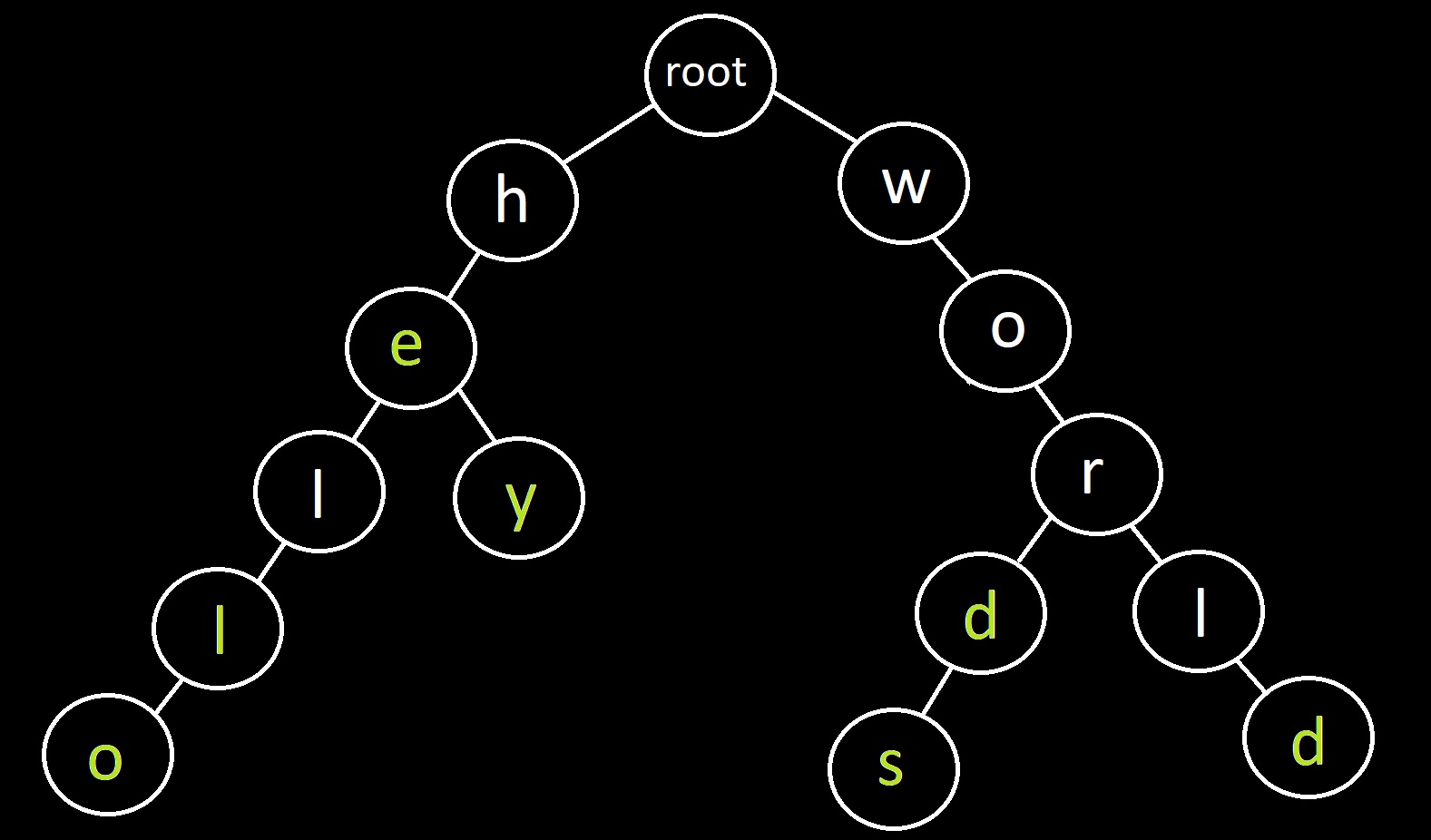
We see from above how the seven words are stored in a very space-saving manner. It also may be becoming clear how storing words in this way is helpful to find the words on a Boggle board. After adding all the words to my Trie, I added a function isWordOrPrefix that takes a string as the input and returns whether the string is a word, a prefix to a word (as in those letters begin forming a word), or returns none. For example, "hello" returns "word", "hel" returns "prefix", and "qyxq" returns "none".
With all the words loaded into the Trie and the isWordOrPrefix function working, finding all the words contained on the Boggle board followed the same basic strategy anyone solving a word-search or Boggle board would use: Start at the top left letter, then scan the adjacent letters that together begin forming words, continuing this way until all the words have been formed from that starting position, and then starting over for every other letter on the board.
Future Improvements 🔨
Since revamping my website I finally decided to update this page a little and implement a few things that were once in this "Future Improvements" section.
- A big improvement is I now (finally) load all the dictionary words and add them to the trie data structure only once on pageload, and then reuse it every time the button is clicked.
- I lazily just defined the trie data structure to be global as a cursory Google search didn't show me a simple way to pass values defined from a
window.onloadfunction call to a function triggered from a button'sonclickvalue.
- I lazily just defined the trie data structure to be global as a cursory Google search didn't show me a simple way to pass values defined from a
- Pretty small, but I'm a bit of a keyboard warrior and don't love using my mouse, so as a small UX tweak I added a little
onkeydownevent to the row and column input elements to click the Generate Board button for you when you type Enter. 💁♀️
I still don't really know JavaScript and the goal has remained to just have something that works rather than follows all best practices, so I'm sure there are definitely more improvements to be made but I will probably leave as is for the time-being.👨💻